
Overview
There are three tasks to perform when building a cluster:
- 11Secure your AWS environment.
- 22Configure the virtual private cloud (VPC) networking for the cluster.
- 33Create the Amazon EKS cluster.
AWS shared responsibility model
AWS operates, manages, and controls the components from the host operating system and virtualization layer down to the physical security of the facilities in which the services operate. This means that AWS is responsible for protecting the global infrastructure that runs all the services offered in the AWS Cloud, including AWS Regions, Availability Zones, and edge locations. The AWS global infrastructure includes the facilities, network, hardware, and operational software [for example, host operating system (OS) and virtualization software] that support the provisioning and use of these resources.
Customers maintain complete control over their content and are responsible for managing critical-content security requirements including customer content stored in AWS, the country in which the content is stored, who has access, and so forth. The type of Amazon EKS shared responsibility model is contingent on a customer’s choices for their cluster’s data plane.
To learn more about how the Amazon EKS shared responsibility model works, interact with the image carousel below. Choose the right arrow to move to the next image, and the left arrow to move to the previous image. To use the zoom feature, choose the zoom image button.
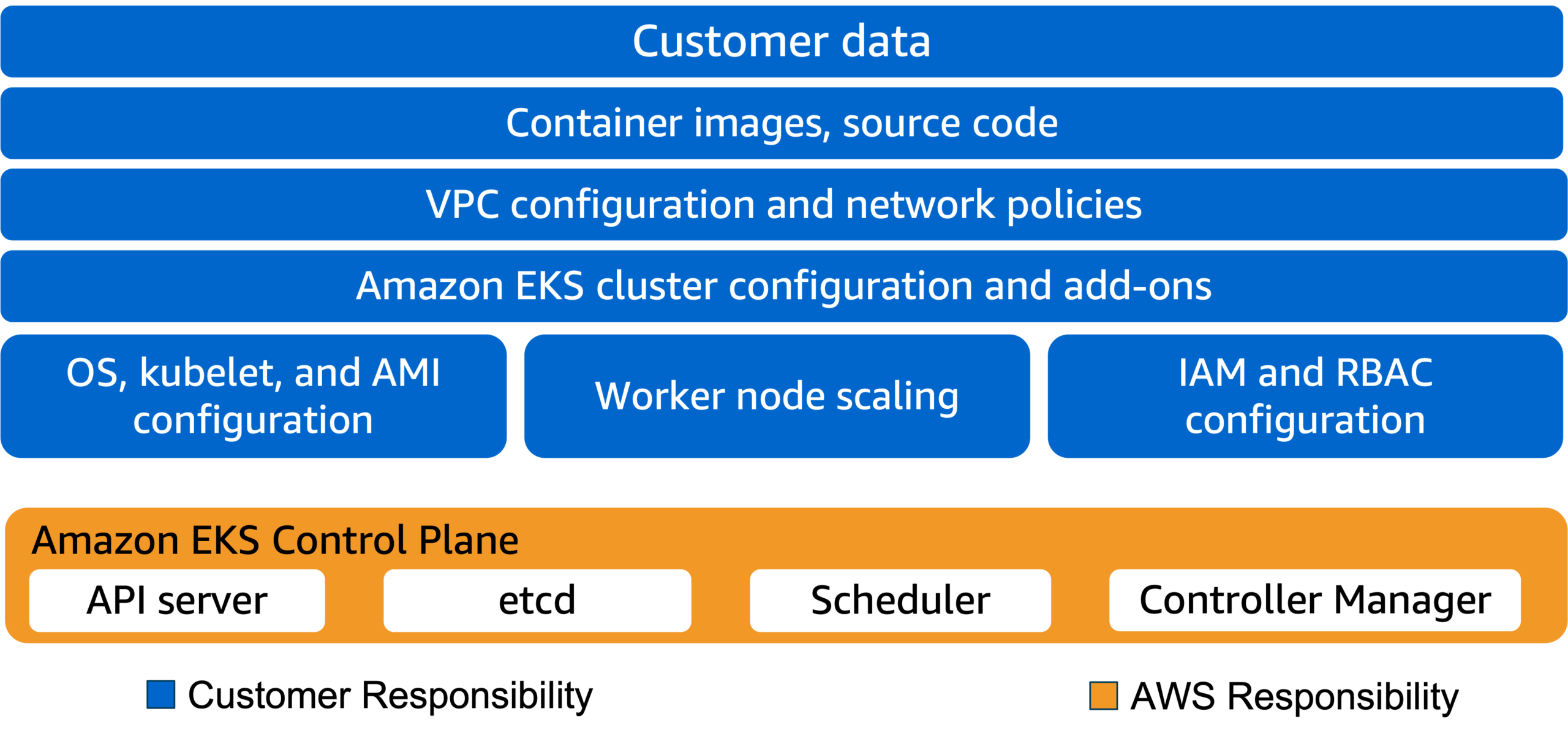
Shared responsibility model with self-managed workers
With Amazon EKS, AWS is responsible for managing the Amazon EKS managed Kubernetes control plane:
- Kubernetes control-plane nodes and services (for example, API server, scheduler, and so forth)
- The etcd datastore
- Other infrastructure necessary for AWS to deliver a secure and reliable service
As a consumer of Amazon EKS, you are responsible for the data plane, including:
- IAM
- Pod security
- Runtime security
- Network security
- Security of the code in your container images
This Amazon EKS shared responsibility model covers the usage of self-managed cluster nodes.
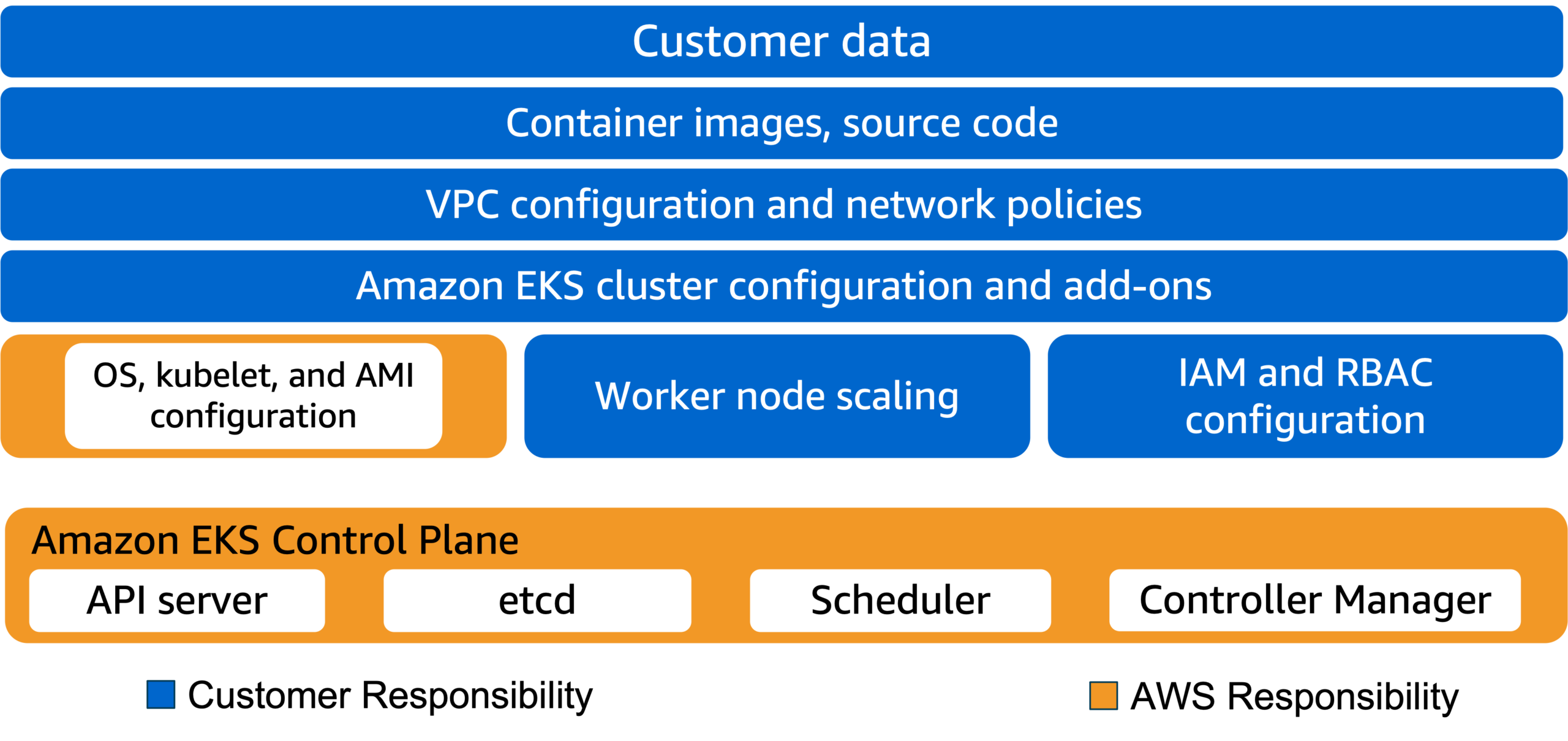
Shared responsibility model with managed node groups
Amazon EKS follows the shared responsibility model for common vulnerabilities and exposures (CVEs) and security patches on managed node groups. AWS is responsible for building patched versions of the Amazon EKS optimized AMI when bugs or issues are reported. You are responsible for deploying these patched AMI versions to your managed node groups.
When your managed nodes run a custom AMI, you are responsible for building and deploying patched versions of the AMI.
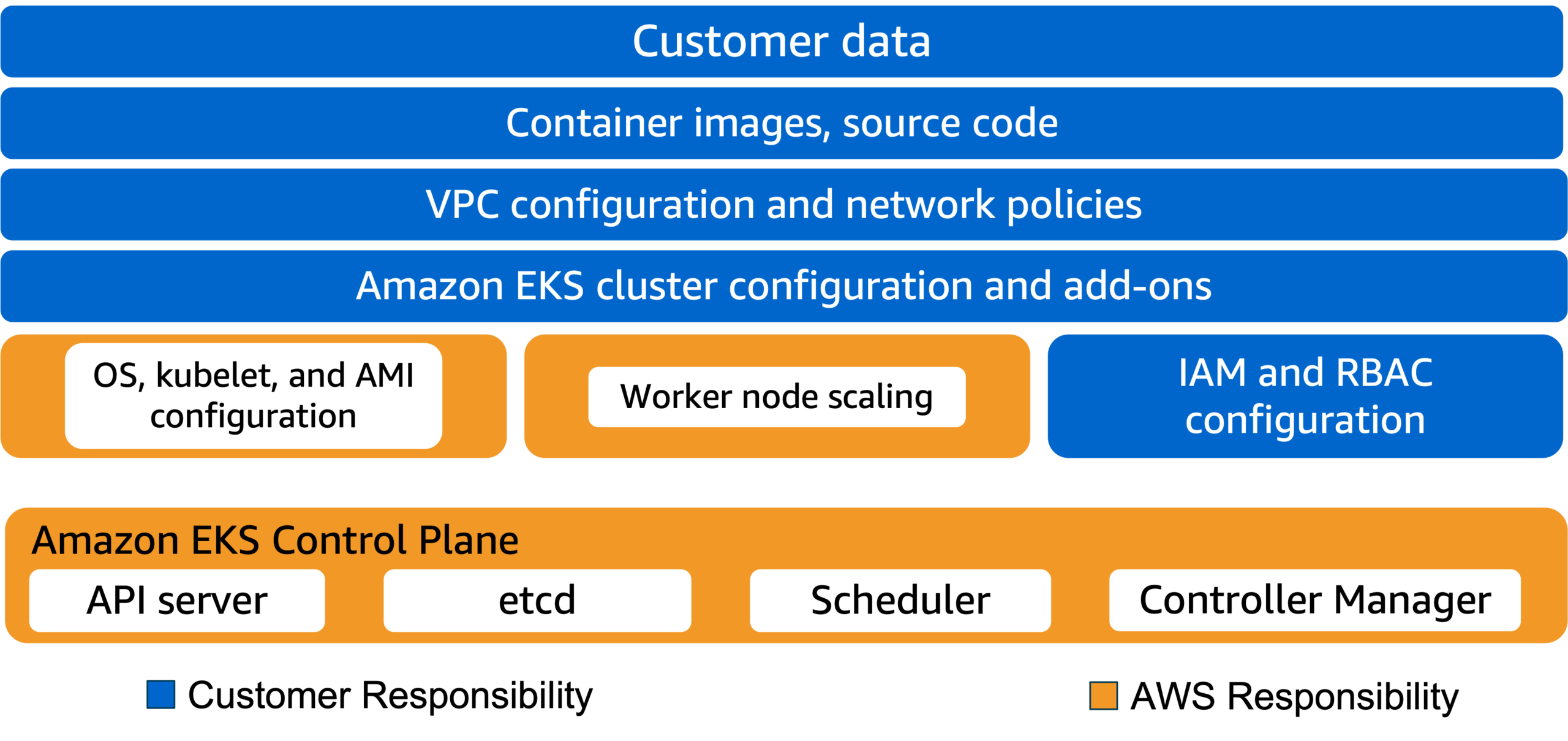
Shared responsibility model with AWS Fargate
With Fargate, AWS is responsible for securing the underlying container runtime to run your pods. While AWS assumes more responsibility for data-plane components, you are still responsible for other aspects of running and maintaining your workloads:
- IAM
- Pod security
- Network security
- Security of the code in your container images
Amazon EKS: Authentication and Authorization

Authentication and authorization
Authentication: When a service or user wants to access your Amazon EKS or Kubernetes resources, the first step is to confirm their identity. If the presented identity credential is not valid, then any further connection or communication is denied.
Authorization: After the identity is validated with authentication, determine if the system should allow the identity to perform the requested action. Grant different permissions depending on the service or user. Perhaps a user is allowed to view the current pods that are running, but they can’t create a deployment. Different identities can have different permissions.
How does authentication and authorization happen in Amazon EKS?
The process for authenticating identities and authorizing commands is different for AWS commands and Kubernetes commands.
Select each of the two tabs to learn more.
For AWS commands, such as aws eks create-cluster, the AWS IAM service handles both authentication and authorization. In this respect, Amazon EKS behaves just like other AWS services.
For Kubernetes commands, such as kubectl get nodes, Amazon EKS uses IAM user authentication to your Kubernetes cluster, but it relies on native Kubernetes RBAC for authorization. Using the IAM service for authentication simplifies cluster user management in two fundamental ways:
- Both IAM and Amazon EKS are integrated services managed by AWS.
- It addresses the issue of Kubernetes not providing end-user authentication.
All permissions for interacting with your Amazon EKS cluster’s Kubernetes API are managed through the native Kubernetes RBAC system.
Example: Running a Kubernetes command with IAM and Kubernetes RBAC
Select each numbered marker to learn more.

- Step 1: You run the kubectl get pods command, which sends an API request to the Kubernetes API server. Your IAM identity is passed along with the request.
- Step 2: Kubernetes verifies your identity with IAM. IAM sends a token verifying your identity back to the Kubernetes API server.
- Step 3: The Kubernetes API server checks its internal RBAC mapping for authorization. This determines if your get pods call is allowed or denied.
- Step 4: If approved, the Kubernetes API server processes the request and sends back the list of pods. If denied, then the client will receive a message stating as such.
Configuring permissions
There are three types of permissions to configure when deploying a new Amazon EKS cluster.
Select each of the three tabs to learn about each type.
Amazon EKS requires permission to make calls to AWS APIs on your behalf to manage the cluster. For example, Amazon EKS needs permission to manage EC2 Auto Scaling for worker nodes. This permission is controlled by the IAM role assigned to your cluster. AWS provides an IAM policy with the recommended permissions for this role.
The kubelet daemon on Amazon EKS worker nodes makes calls to AWS APIs on your behalf; for example, pulling container images from the Amazon Elastic Container Registry (Amazon ECR). Worker nodes receive permissions for these API calls through an IAM role assigned to the worker nodes.
The administrators who will manage your Kubernetes cluster need permission to make calls to the Kubernetes API. This is accomplished by mapping an IAM role to a Kubernetes RBAC user. The IAM role used to create the cluster will have full permission to manage the cluster, which is more permission than is usually required. For this reason, best practice is that you create a specific IAM role just for deploying clusters. Create additional principals in IAM that map to more restrictive roles in RBAC for routine operations, following the principle of least privilege.
Configuring networking
Before creating an Amazon EKS cluster, you must decide whether you will use one of your existing Amazon VPCs or if you will create a new VPC for your Amazon EKS cluster. If you want to use an existing VPC, it must meet specific requirements for use with Amazon EKS. For more information, see Cluster VPC considerations in the Amazon EKS User Guide.
VPCs for Amazon EKS clusters can use one of three common design patterns:
- Only public subnets
- Only private subnets
- Public and private subnets
Select each of the three tabs to learn about each option.
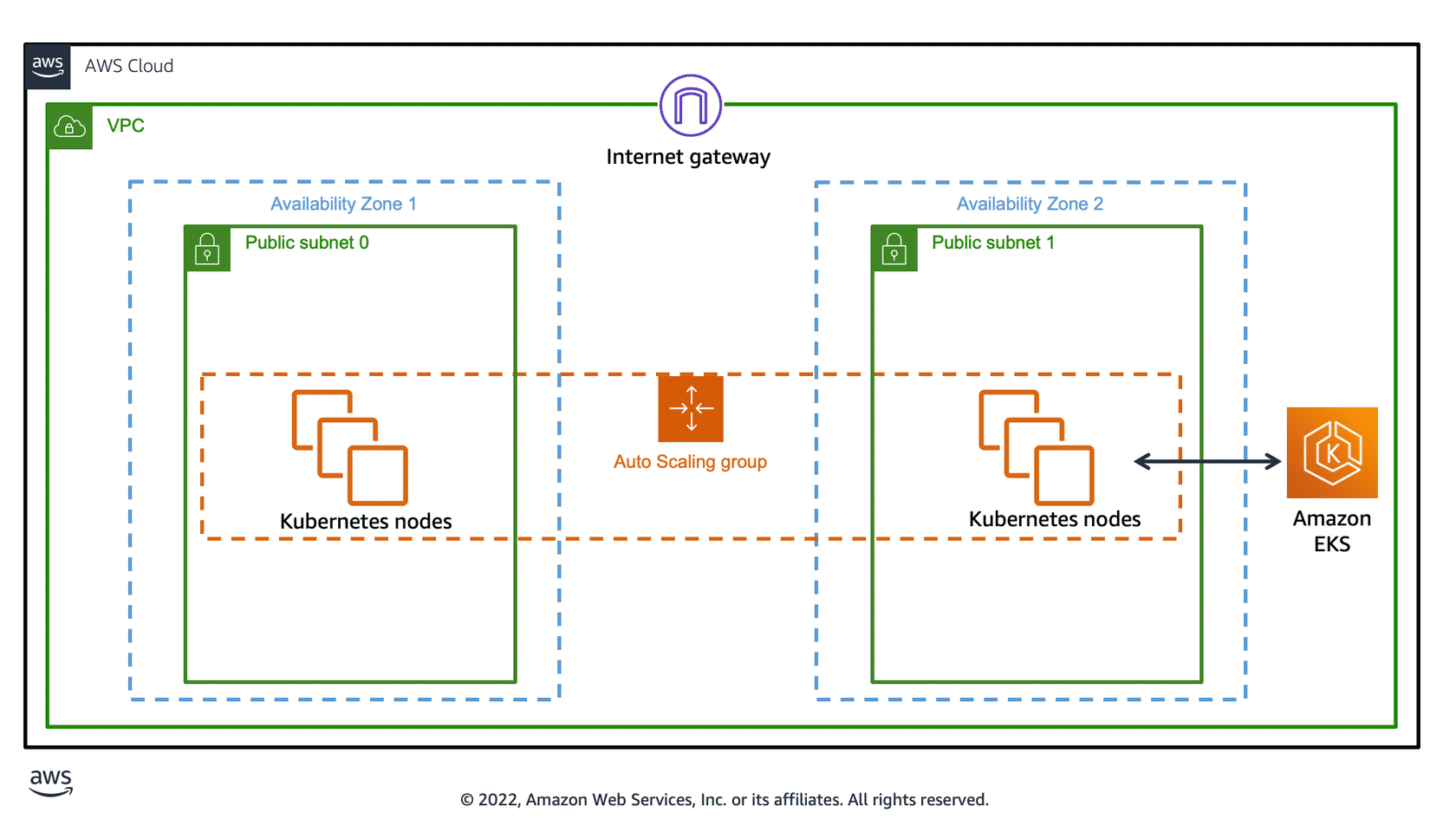
This VPC has three public subnets at most that are deployed into different Availability Zones in the Region. All worker nodes are automatically assigned public IP addresses and can send and receive internet traffic through an internet gateway. A security group is deployed that denies all inbound traffic and allows all outbound traffic.
This VPC has three private subnets at most that are deployed into different Availability Zones in the Region. All nodes can optionally send and receive internet traffic through a network address translation (NAT) instance or NAT gateway. A security group is deployed that denies all inbound traffic and allows all outbound traffic.
The following diagram illustrates a basic configuration of worker nodes deployed to private subnets in two Availability Zones. The diagram includes an option of using NAT gateways to provide worker nodes external network access to other AWS services and the public internet. The NAT gateway in each Availability Zone deployment pattern is a recommended practice for meeting high availability requirements.
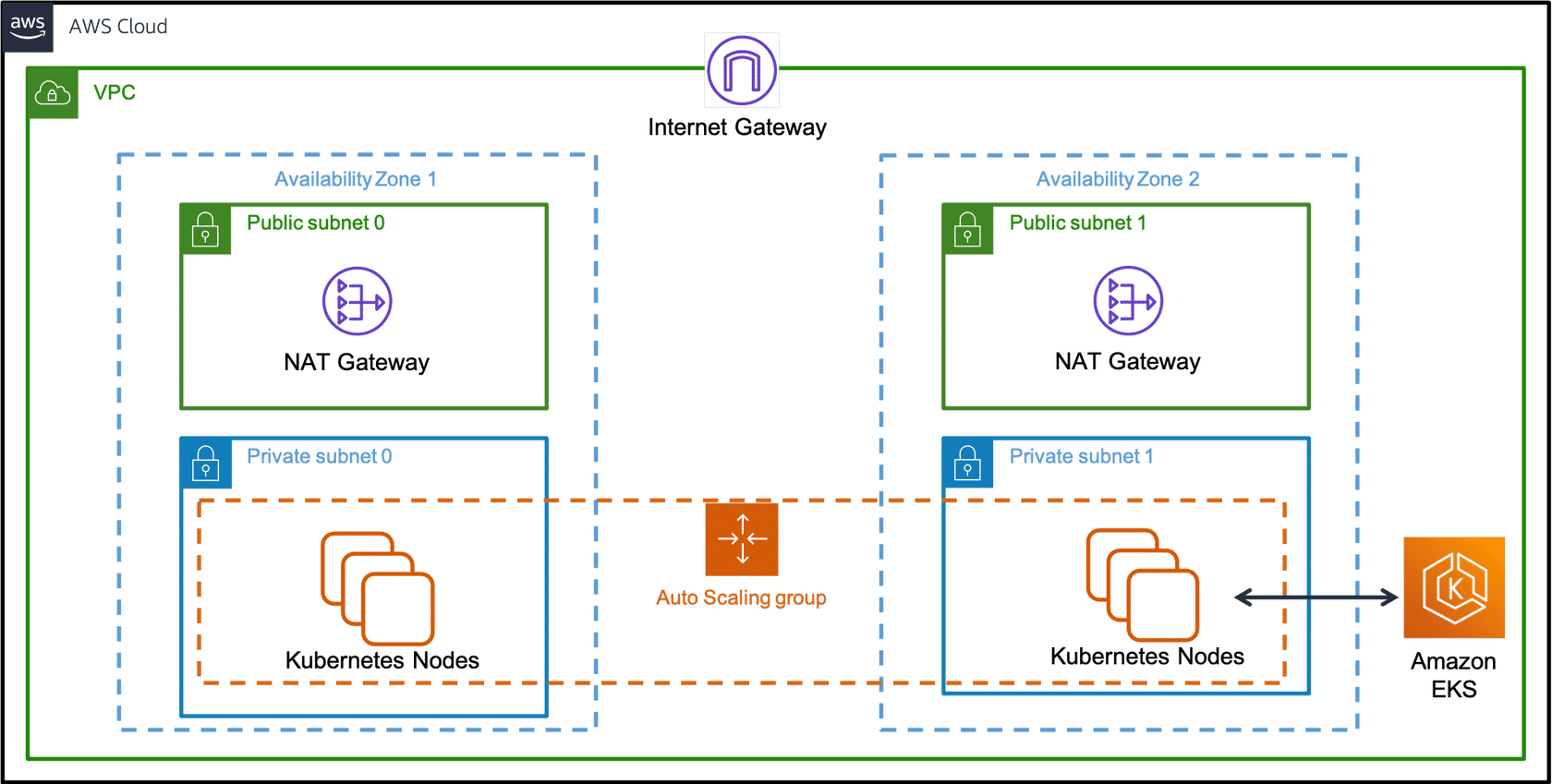
This VPC has two public subnets and two private subnets. One public and one private subnet are deployed to the same Availability Zone. The other public and private subnets are deployed to a second Availability Zone in the same Region. We recommend this option for all production deployments. With this option, you can deploy your worker nodes to private subnets. Kubernetes can deploy load balancers to the public subnets. These load balancers can balance traffic to pods running on worker nodes in the private subnets.
Public IP addresses are automatically assigned to resources deployed to one of the public subnets. However, public IP addresses are not assigned to any resources deployed to the private subnets. The worker nodes in private subnets can communicate with the cluster and other AWS services. Pods can communicate outbound to the internet through a NAT gateway that is deployed in each Availability Zone. A security group is deployed that denies all inbound traffic and allows all outbound traffic. The subnets are tagged so that Kubernetes can deploy load balancers to them.
For more information about subnet tagging, see Subnet tagging requirements in the Amazon EKS User Guide.
For more information about this type of VPC, see VPC with public and private subnets (NAT) in the Amazon VPC User Guide.
